Mike Montgomery at the GoPro Mountain Games sharing his tips for mounting cameras on a mountain bike and helmet and capturing different perspectives while riding on the trails. Plus, get some ProTune tips.
Athlete: Mike Montgomery
Vertical: Mountain Biking
Topics: Protune Shooting Modes, Roll Bar Mount, Handlebar/Seatpost/Pole Mount, Blackout Housing
In episode 19 of GoPro’s Athlete Tips and Tricks series, Mike Montgomery meets up with us at the GoPro Mountain Games to share his tips for mounting cameras on a mountain bike and helmet. He shows us how to use the Blackout Housing with a variety of mounts to capture different perspectives while riding on the trails. Mike also shares his favorite video mode for POV cams — 1440/48 in Protune with ISO 400.
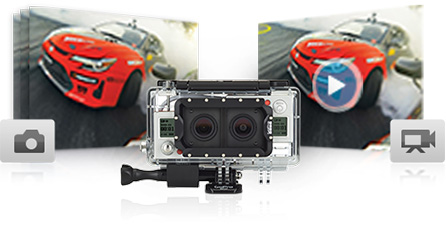
The new Dual HERO System holds two HERO3+ Black cameras (sold separately), enabling you to capture full-resolution video and photos simultaneously with uncompromised image quality. You can also record synchronized footage to convert to 3D using GoPro Studio editing software, available free at gopro.com. Creating 3D content has never been easier.
Capture video and photos simultaneously
The Dual HERO System enables you to capture full-resolution video and photos simultaneously with uncompromised image quality.
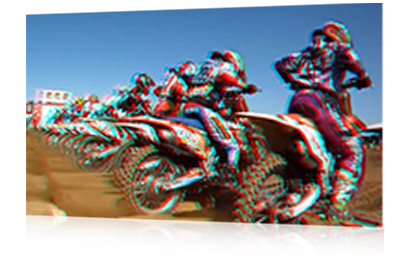
Create 3D content
Imagine how incredible your footage would look in 3D. The Dual HERO System makes it easy to record synchronized 2D videos or photos to convert to 3D using free GoPro Studio editing software.
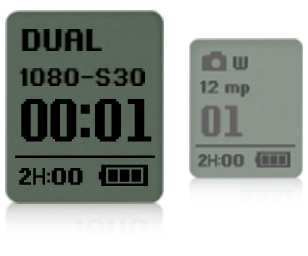
Control both cameras at once
Featuring single interface control, one camera controls the other camera’s settings and modes for convenient setup.
Integrated Mini USB port
Use the included Skeleton Backdoor to access the Dual HERO System’s integrated Mini USB port for data offload, battery charging, and live-feed video to an external monitor (requires GoPro Composite or Combo Cable, sold separately).
Waterproof and durable
The Dual HERO System is waterproof to 197’ (60m), and made to withstand wet, damp or dirty conditions so you can capture footage in nearly any environment.
Includes 3D glasses
View the 3D content you’ve created on your compatible 3D TV or computer with the included 3D anaglyph glasses.
Andrew Whiteford has been synonymous with the explosion in popularity of POV cameras and the flood of self-edits that rob Youtube of its bandwidth year in and year out. The Vermont transplant to Jackson Hole was one of the first in skiing to turn himself pro almost exclusively through the use of his own self-edits, and then repeated the feat in the bike world. Here Andrew shares a few of his secrets that will help you turn your own POV edits from messes of shaky footage and unremarkable angles into the internet gold of tomorrow.
#1 – MIX UP YOUR ANGLES
Andrew mounted his GoPro way up on an extended pole to capture his rappell into a conical ice cave in Alaska.
I film a lot and then I try to be really selective with the clips that I use. I try to keep just the A-roll footage. I always just keep it in my mind the idea that I’m watching a ski movie, and what I’d want to happen. Sometimes I want that feeling of your stomach going up into your throat as you come over the edge of the cliff, which lends itself to the helmet-mounted view. If it’s something more immersive when you’re on a bike, you can use the chest cam, or the pole cam if you’re skiing through something really narrow or super-deep powder. The pole cam is great, too, for when interesting things are going on around you or something ridiculous is happening to you, like a branch hitting you in the face. But in the end, I end up using the helmet cam so much because it tends to be the smoothest. And it’s kind of a “set it and forget it” kind of thing, and I don’t mind the Teletubby look so much.
If I’m reviewing footage, I’ll find shots I thought weren’t super cool at the time that actually look really cool on camera. I’ll always keep those in the running for shots to use, at least to mix it up. I think with ski mountaineering becoming a bigger part of what I’m looking to do, being able to show climbing footage and repelling and all that is really fun.
In the summer, when you’re on your bike or doing another sport, it’s nice to be able to go out in a lot of different weather and in different climates and in different ecosystems and shoot. It’s way more interesting to be able to show the desert and then the rainforest and then deciduous forest and foliage and all of that. Whereas when you’re skiing or snowboarding, it’s always a snow-covered mountain.
#2 – KEEP IT SHORT AND RELATABLE
Nowadays, the POV market is so saturated. We could have our choice of a thousand different videos of the same thing to watch every day. So it’s a battle to keep people interested for the couple of minutes that you can, if that. I struggle with keeping my videos short enough that people watch until the end. I often have to weigh that short attention span more than the value of any story that I’m trying to convey through the video. But in the end, it’s just me trying to show how much fun I’m having out there.
The self-edit is always a fine line between having something that looks really cool and is compelling, but shows that you aren’t trying super hard. That keeps it original and more relatable. Because if you start putting up flashy titles and stuff like that, all of a sudden, you’re being compared against TGR or Brain Farm or Ant Hill. And then you’ve got to find a couple of million dollars for your budget.
#3 – WATCH YOUR ANGLES AND TIGHTEN YOUR MOUNTS
The mistake that most people make with their POV edits is having really shaky footage, which is often due to not having the mounts on tight enough is. The angle of the camera is a big thing, too, and I still struggle with that. It’s often a balance of trying to find an angle where you can see the action and some of your skis or bike, but can still see the horizon so you have some perspective and don’t get carsick.
#4 – TRY ROLLING SOLO WHEN YOU’RE EXPERIMENTING
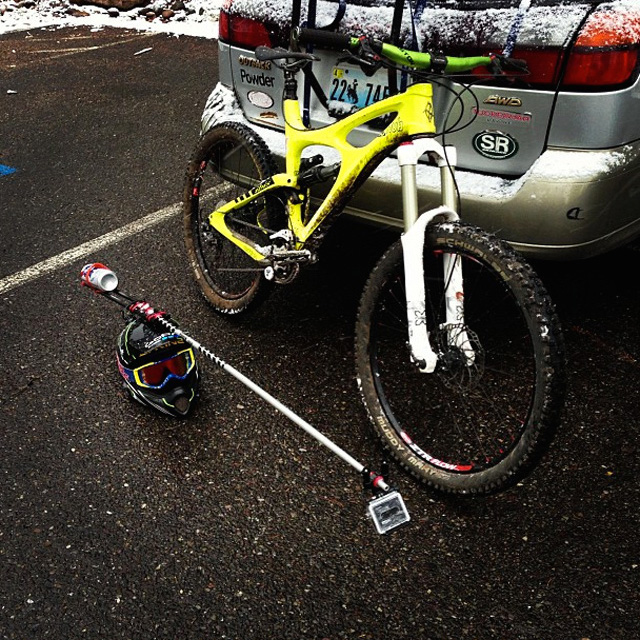
Whiteford’s awful shy when he’s utilizing his most outlandish POV mounts, so he picks the worst weather days to use tools like his “Narwal mount” in the hopes no one else is out on the trail.
When I’m shooting my POV stuff, I’m often out alone. Particularly if I’m using some really dorky mount, like the Narwhal cam protruding from my helmet. That Narwhal cam involved strapping a 150-centimeter aluminum cross-country ski pole to the top of the helmet and attaching an L-bracket on the back of the helmet, into which I put a 24-ounce PBR tall boy as a counterweight. After all, you gotta have something to drink at the end. Any time I went out with that thing, it was on a shitty weather day so I wouldn’t run into anybody else on the trail. Because I just looked like a total goober. And I only rode the trails I knew super well and could ride smoothly so that the footage had the best chance of coming out well.
#5 – AUDIO IS KEY
While we always focus so much on the video, finding some cool audio to go along with it is absolutely critical. The best-case scenario is the actual activity that you’re filming has some cool ambient audio. I’ve always felt that the soundtrack plays a huge part in what you’re trying to put out in order to make it watchable, too. Obviously, I didn’t have Wiz Khalifa’s permission to use “Black and Yellow,” but on the small side of the spectrum, I think you can get away with a lot. When GoPro shares one of my videos and gets a couple hundred thousand views in a few minutes, that’s when I usually get a cease and desist letter.
Want to know more about Andrew Whiteford? Read Teton Gravity Research’s May 21st interview with Andrew about how he became internet famous here.
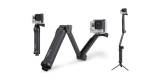
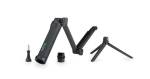
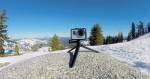
This ultra-versatile mount can be used three main ways: as a camera grip, extension arm or tripod. The folding arm is perfect for POV or follow-cam footage, and makes it easy to capture selfies without the mount appearing in the shot. When detached from the arm, the handle doubles as a camera grip. Stored inside the handle is a lightweight, mini tripod that can be removed and used on its own or combined with the handle. Expands to 20” (50.8cm), collapses to 7.5” (19cm).
Can be used three main ways: as a camera grip, extension arm or tripod
Configurable for a wide range of uses, from capturing POV footage and selfies, to follow-cam, static tripod shots and more
Folding arm makes it easy to capture selfies without the mount appearing in the shot
Use the arm plus grip like a pole mount for immersive POV or follow-cam footage
Handle can be detached from the arm and used as a camera grip
Removable tripod conveniently stores inside the handle
Lightweight, mini tripod can be used on its own or combined with the handle
Waterproof construction for use in and out of the water
Measures 20” (50.8cm) when fully extended, collapses to 7.5” (19cm)
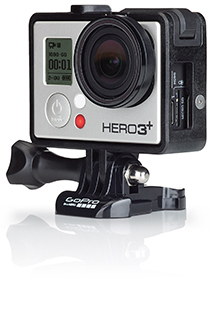
Sometimes you need a little stealth when you’re capturing that all-important shot — and it can be advantageous not to draw attention to your camera — in those cases, the GoPro Blackout Housing is your best bet. Made with an all-matte-black non-reflective finish, this housing helps your GoPro just fade into the background, letting you record video without making your camera the center of attention. Included stickers let you cover your LCD screen, further disguising it from your subject, while waterproofing down to 40 meters lets you get shots in nearly any condition. Sub out the skeleton backdoor for when capturing audio clearly is a must, or use the standard backdoor for total coverage.
Whether in the studio, jamming with friends or playing a gig, the HERO3+ Black Edition/Music bundle has everything you need to capture engaging, pro-quality photos and video of your performance. Mount the camera to instruments, turntables, mic stands and stage equipment for immersive GoPro-style footage that allows friends and fans to experience your music in a whole new way. And with the GoPro App and GoPro Studio editing software, you’ll have all the tools you need to share your music with the world, and create professional content to promote on YouTube™, Facebook®, Instagram™ and more.
Capture your performance
Now musicians of all levels—from rising stars to superstars—can capture engaging, pro-quality photos and videos of their performances.
Mounts made for music.
Mount your GoPro to instruments, mic stands, stage equipment and more to capture footage hands-free while you perform. Designed with musicians in mind, the included mounts deliver an ultra-immersive perspective of your performance that draws your audience in, and allows them to experience your music like never before.
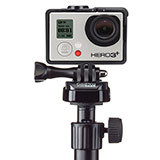
(1) Removable Instrument Mounts: Mount the camera to your guitar, drums, turntables, keyboard or other instrument with these easy-to-remove, non-damaging adhesive mounts.(3) Clamp the camera to cymbal stands, drum hardware, turntables and more. The removable neck delivers versatile camera-angle adjustability.(2) Mount the camera to your mic stand. Compatible with standard U.S. 5/8”-27 mic stands. Includes an adapter for European 3/8”-16 mic stands.
Capture. Create. Share.
Take your music to the masses, and connect with friends and fans worldwide. Use the GoPro App to share photos and videos via email, text or social networking sites.1 Free GoPro Studio editing software provides the tools to easily create professional music videos to promote virally on YouTube, Facebook, Vimeo® and more.
Small, lightweight design.
Weighing just 2.6 ounces, the tiny HERO3+ Black Edition camera ensures it’s your performance, not its presence, that holds your audience’s attention. Its small size makes it ideal for mounting to instruments and low-profile capture onstage.
Professional video quality.
Stunning video quality has made GoPro the world’s best-selling camera company, and the HERO3+ Black Edition continues this tradition. High-resolution, high-frame rate 1440p48, 1080p60, 960p100 and 720p120 video modes result in gorgeous footage optimized for professional productions. 4K15 and 2.7K30 modes enable ultra high-resolution, cinema quality capture.
Brilliant performance in low light.
Capture gorgeous video even in dimly-lit settings. The HERO3+ Black Edition features a new Auto Low Light mode that intelligently adjusts frame rates based on lighting conditions for enhanced low-light performance. So whether you’re at a late-night festival or jamming in your garage, you’ll walk away with crisp, clear footage of your performance.
Ultra wide angle lens.
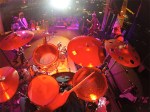
Fit the whole band in the frame thanks to the HERO3+ Black Edition’s ultra wide angle lens. It’s great for capturing large groups in small spaces—like a cramped rehearsal room or crowded club—and delivers an expansive field of view for dynamic, engaging footage.
Powerful photo capture.
A variety of photo options enable you to capture high-quality 12MP stills for all your production needs—from creating album art, to documenting life on tour. For fast-action shots, like drum solos and fancy fretwork, capture up to 30 frames per second so you never miss a moment. Or set the camera to Time Lapse mode to capture photos automatically while you play.
Flexible audio capture.
Record audio with the built-in microphone, or attach an external microphone (sold separately) using the included 3.5mm stereo mic adapter.
Introducing SuperView.
Only the HERO3+ Black Edition features SuperView™, a GoPro-exclusive video mode that captures the world’s most immersive wide angle perspective. It’s great for instrument-mounted shots, and allows you to get more of yourself and your gear in the frame. Plus, SuperView makes for gorgeous wide-screen playback on your computer or TV.
Control, view, share with built in Wi-Fi.
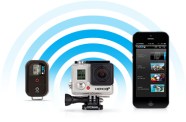
With speedy built-in Wi-Fi, you can control up to 50 cameras remotely from distances of up to 600’ (180m) using the Wi-Fi Remote (sold separately)—the perfect solution for operating multiple cameras mounted to instruments and equipment onstage. Or use the GoPro App for full remote control of all camera functions plus content preview, playback and sharing.1
Extended battery life.
With 30% longer battery life compared to previous models, the HERO3+ Black Edition makes it possible to capture the entire set, including the encore, on a single charge.
Join the adventure in beautiful New Zealand as Ben Brown and Rush Sturges attempt to tackle the gnarliest of river flows. Hucking over some of the most dangerous waterfalls in the world, these guys continue to push the limits.



 Waterproof and durable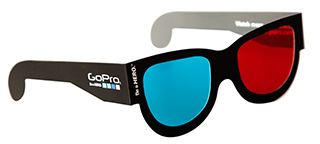






 Get your jam on. GoPro


 Capture. Create. Share.
 Small, lightweight design.
 Professional video quality.
 Brilliant performance in low light.
 Ultra wide angle lens.
 Powerful photo capture.
 Flexible audio capture.
 Extended battery life.
 pacificrepworks.com
You must be logged in to post a comment.